
Provide a UI for SRE agents in Studio
If you already have an agent running in the SmythOS Runtime Environment (SRE), you can surface it in the Studio Builder with a simple web chat. No heavy front end work required.
Step 1: Confirm your SRE Agent Works
Run your project and verify the agent responds as expected in the console.
Example: a test skill that accepts a name and returns Hello, <name>.
$ npm start
? Enter session ID: demo-session
> Raul
> Hello Raul
Step 2: Expose Your Agent as an API
Add a small server file in your SRE project that forwards chat requests to the same agent methods you used with Terminal Chat. Keep it minimal. The goal is a stable endpoint Studio can call.
Step 3: Connect the Endpoint in Studio
Open the Studio Canvas and point it to your local agent endpoint. Studio will load a simple chat interface so you can interact with the SRE agent in the browser.
Step 4: Test the Chat UI
Send a message from the Studio chat window and confirm the response matches your console test.
- Input:
Raul - Output:
Hello Raul
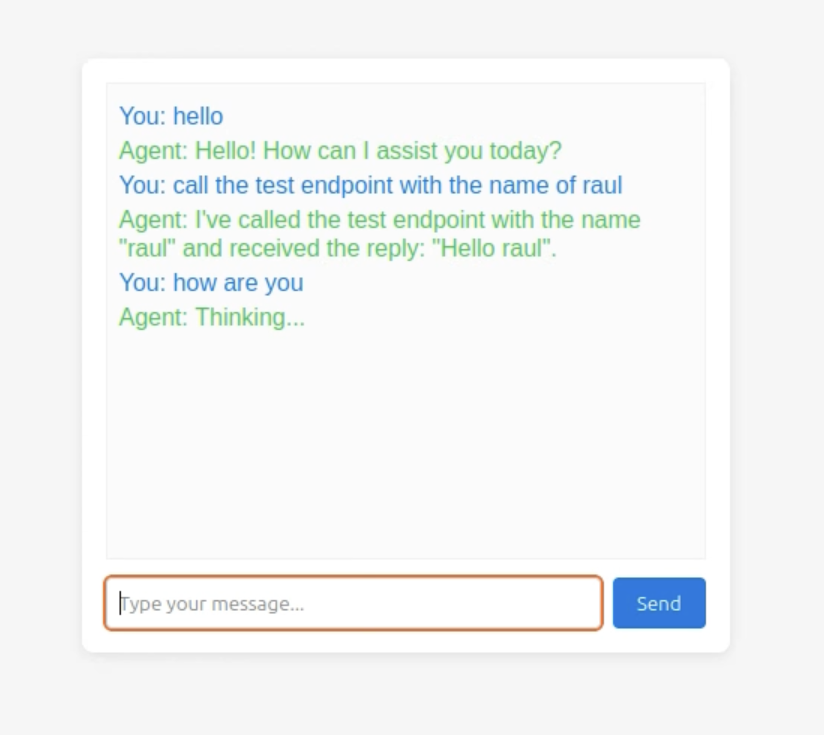
The SRE agent running in Studio with a browser-based chat UI.
Step 5: Grow the UI as your agent evolves
Start simple and iterate. Add input fields, basic styling, or small ops features like session reset. Keep the agent contract stable so Studio can call it reliably.
FAQs
What's next
- Review the Runtime overview to understand how agents execute.
- Explore Studio Canvas for richer visual flows.
- When you are ready to share the UI, see Deployments.